DVI
DVI (Digital Visual Interface) was designed as a transitional standard to replace VGA while maintaining backward compatibility with analog signals. Released in 1999 by the Digital Display Working Group (DDWG), DVI can carry digital video, analog video, or both, depending on the variant. The connector is white and uses a distinctive pin layout with a flat blade pin on one side. While being phased out in favor of HDMI and DisplayPort, DVI is still found on many monitors and graphics cards.
Primary Use
Digital & Analog Video Output
Reference Image
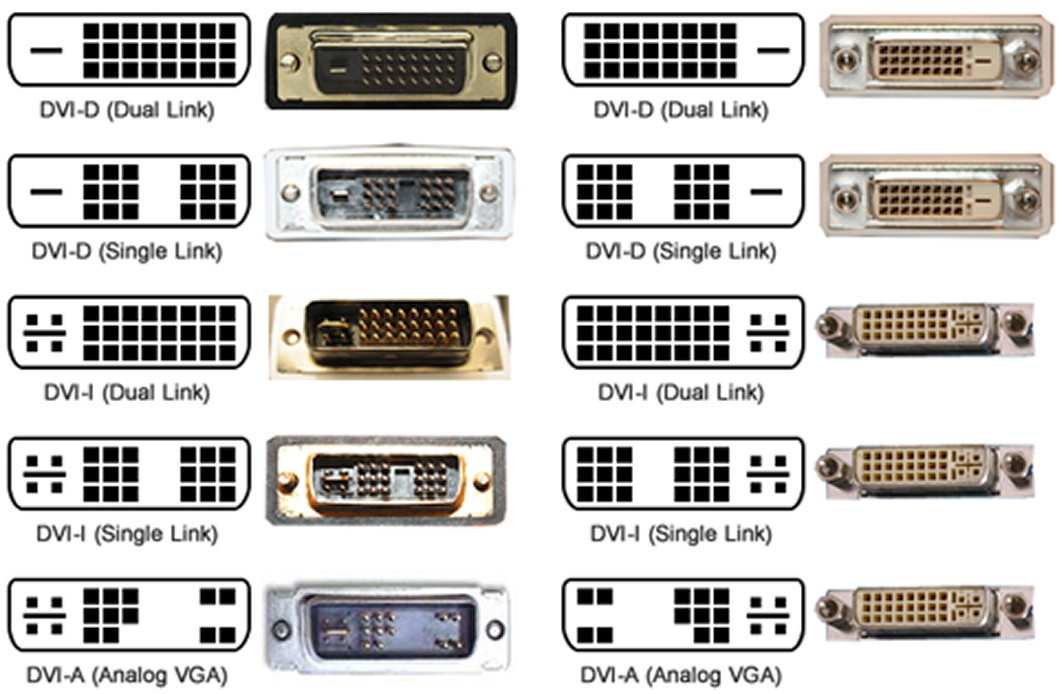
Key Features
- White-colored connector (industry standard color coding)
- Rectangular shape with a flat blade pin (+) on the right side
- Up to 29 pins depending on variant (single-link vs dual-link)
- Distinctive flat blade/cross pin used for analog signal
- Three main variants: DVI-A (analog), DVI-D (digital), DVI-I (integrated)
- Single-link supports up to 1920x1200 @ 60Hz
- Dual-link supports up to 2560x1600 @ 60Hz
- Does NOT carry audio (video only, like VGA)
- Uses thumbscrews for secure connection (like VGA)
Variants & Standards
DVI-A (Analog)
DVI-D Single-Link
DVI-D Dual-Link
DVI-I Single-Link
DVI-I Dual-Link
Quick ID Tips
1 WHITE connector - this is the quickest visual identifier
2 Look for the flat blade (+) pin on the right side - this distinguishes DVI from other connectors
3 Larger than HDMI, roughly similar size to VGA but rectangular instead of D-shaped
4 Has thumbscrews like VGA but is a different shape
5 Count the pins around the flat blade to determine the variant (A, D, or I)
6 DVI-D has no pins around the flat blade, DVI-I has 4 pins around the flat blade
A+ Exam Notes
The KEY exam trick: look at the flat blade pin. DVI-D = no pins around blade, DVI-I = 4 pins around blade
DVI-A is analog only, DVI-D is digital only, DVI-I is integrated (both)
Single-link vs dual-link: count the pins in the main rectangular grid (18 vs 24)
DVI does NOT carry audio - just like VGA. This is different from HDMI.
DVI-I can use a simple passive adapter to connect to VGA (because it has analog signals)
DVI-D CANNOT connect to VGA without an active converter (no analog signal)
Maximum resolution for dual-link DVI is 2560x1600 @ 60Hz
At a Glance
Display
5
9
7