USB
USB (Universal Serial Bus) is the most widely used interface for connecting peripherals to computers and for charging devices. Since its introduction in 1996, USB has gone through multiple generations, each increasing speed and capability. USB replaced a variety of older interfaces including serial ports, parallel ports, and PS/2 connectors. Modern USB-C is becoming the universal standard connector for data, video, and power delivery.
Primary Use
Data Transfer, Charging & Peripheral Connectivity
Reference Image
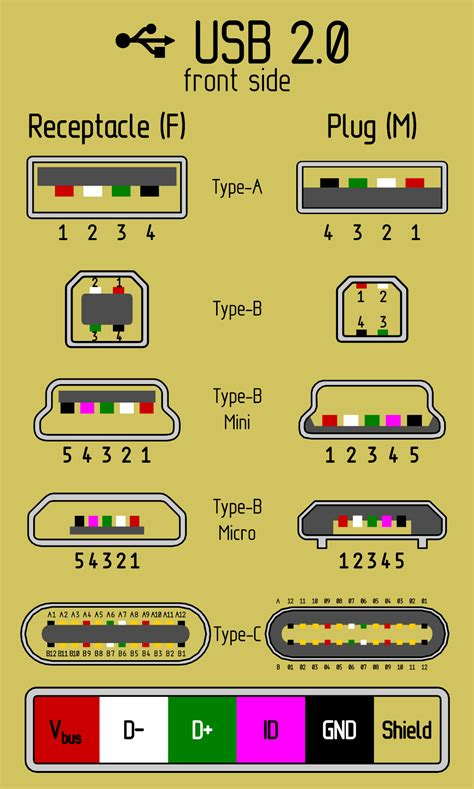
Key Features
- Multiple connector types: Type-A, Type-B, Mini, Micro, and Type-C
- Supports data transfer, power delivery, and even video output (USB-C)
- Color-coded connectors indicate speed generation (black=2.0, blue=3.0, teal=3.1 Gen 2, red=charging)
- USB-C is reversible - no wrong way to plug it in
- USB-A has a specific orientation - the USB trident logo faces up
- Backward compatible across generations (speed limited to slower device)
- Supports hot-swapping - connect/disconnect without restarting
- USB Power Delivery (USB-PD) can deliver up to 240W of power over USB-C
Variants & Standards
USB Type-A
USB Type-B
USB Mini-B
USB Micro-B
USB Type-C
USB 2.0
USB 3.0 / 3.1 Gen 1 / 3.2 Gen 1
USB 3.1 Gen 2 / 3.2 Gen 2
USB 3.2 Gen 2x2
USB4
Quick ID Tips
1 USB-A: Flat rectangular connector - by far the most recognizable USB plug
2 USB-B: Square-ish with beveled top corners - found on printers and scanners
3 Mini-USB: Small trapezoid shape - older cameras, controllers, GPS devices
4 Micro-USB: Very flat and wide, small tab - older phones and tablets
5 USB-C: Small oval/rounded rectangle - reversible, newest standard
6 Check connector color: Black = USB 2.0, Blue = USB 3.0, Teal = USB 3.1 Gen 2
7 The USB trident logo (fork symbol) is printed on most USB-A connectors
A+ Exam Notes
USB naming has been confusing - USB 3.0, 3.1 Gen 1, and 3.2 Gen 1 are ALL the same 5 Gbps speed
Color coding is key: Black = 2.0 (480 Mbps), Blue = 3.0 (5 Gbps)
USB-C is a CONNECTOR type, not a speed - USB-C can carry USB 2.0, 3.x, or USB4
Know the physical difference between all 5 connector types (A, B, Mini, Micro, C)
USB-A 3.0 connectors have additional pins deeper in the connector (visible as blue plastic)
Thunderbolt 3 and 4 use the USB-C connector but are NOT the same as USB
USB Power Delivery negotiates voltage/amperage - up to 48V/5A (240W) on USB-C
At a Glance
Data / Power
10
8
7